 Coming soon
 Reply in your own voice, post stronger, and know who follows you back.
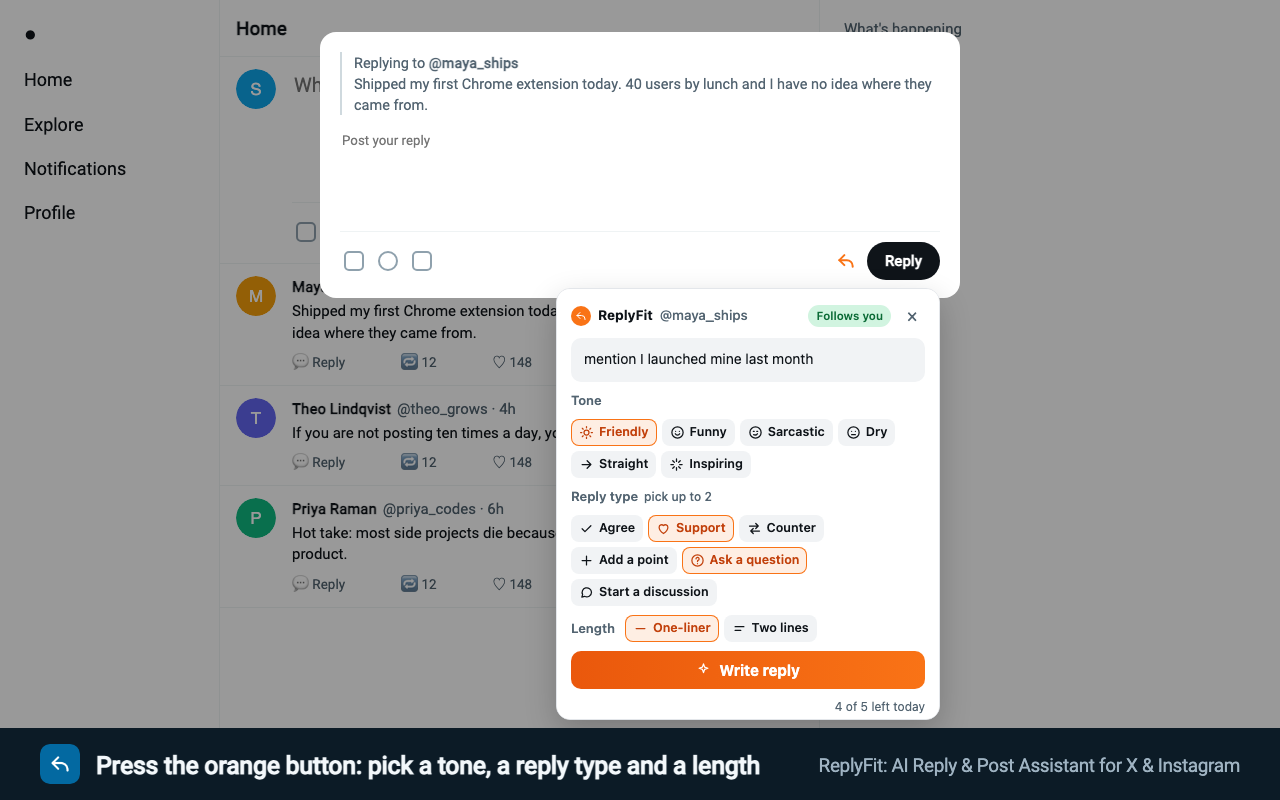
Open a reply box on X or Instagram and a small orange ReplyFit button waits next to Reply. Press it for a reply in the tone you pick, from funny to sarcastic, or to tidy the one you wrote. Writing a post on X? The same button writes a viral post from a topic in one click, or makes your own draft go viral. You edit and press Post yourself.
- Replies on X and Instagram, posts on X
- You always press Post
- Free: 20 a day for your first 3 days
ReplyFit
One reply in your voice, checked before you see it
If it misses a check, ReplyFit quietly writes it again first. Use puts it in the reply box, where you edit it and press Post yourself. Want a different one? Try another.
- Checked before you see it
- Nothing posted for you
ReplyFit
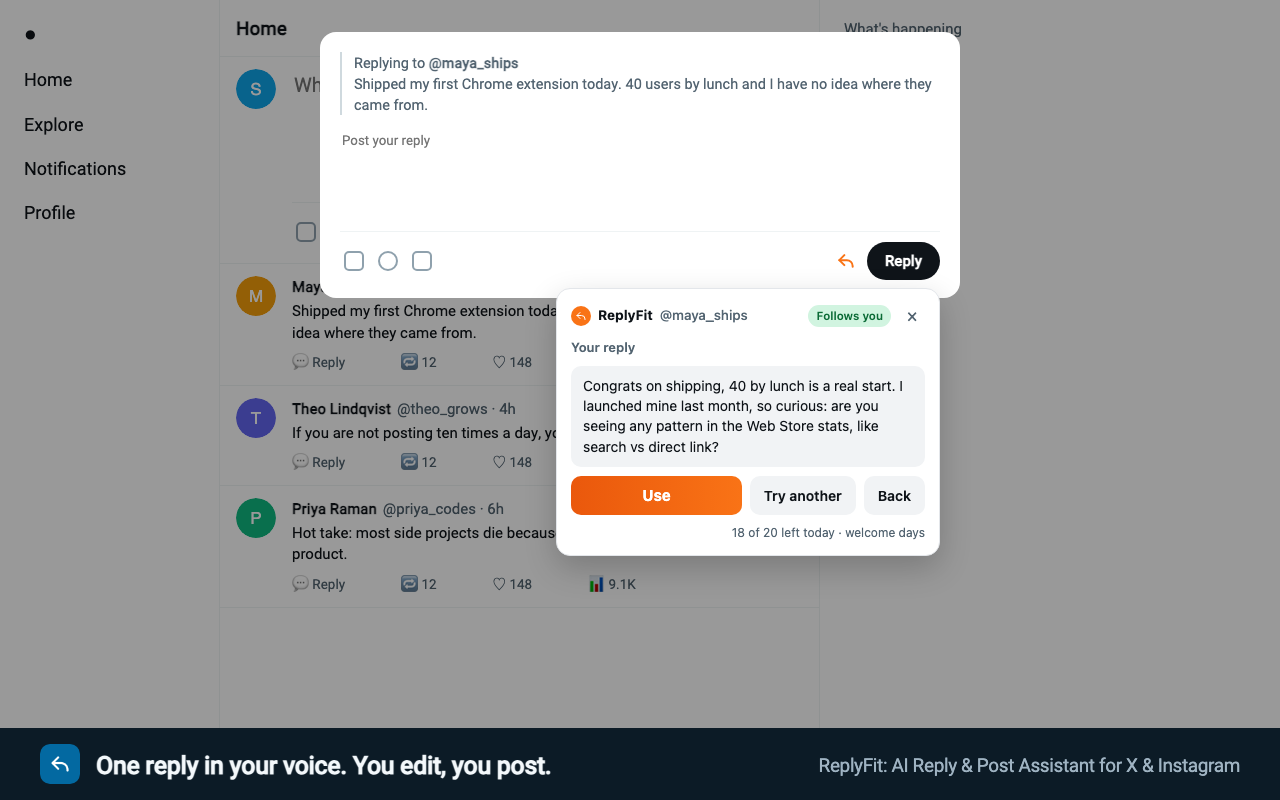
Empty post box? A viral post from a topic, in one click
Press the orange button in the empty “What’s happening?” box, type a topic (or leave it empty to use the line about you) and press Write a viral post. It opens with a line that stops the scroll, shares a real take or question, and never makes up stories or numbers about you.
- A topic is enough
- Nothing invented about you
ReplyFit
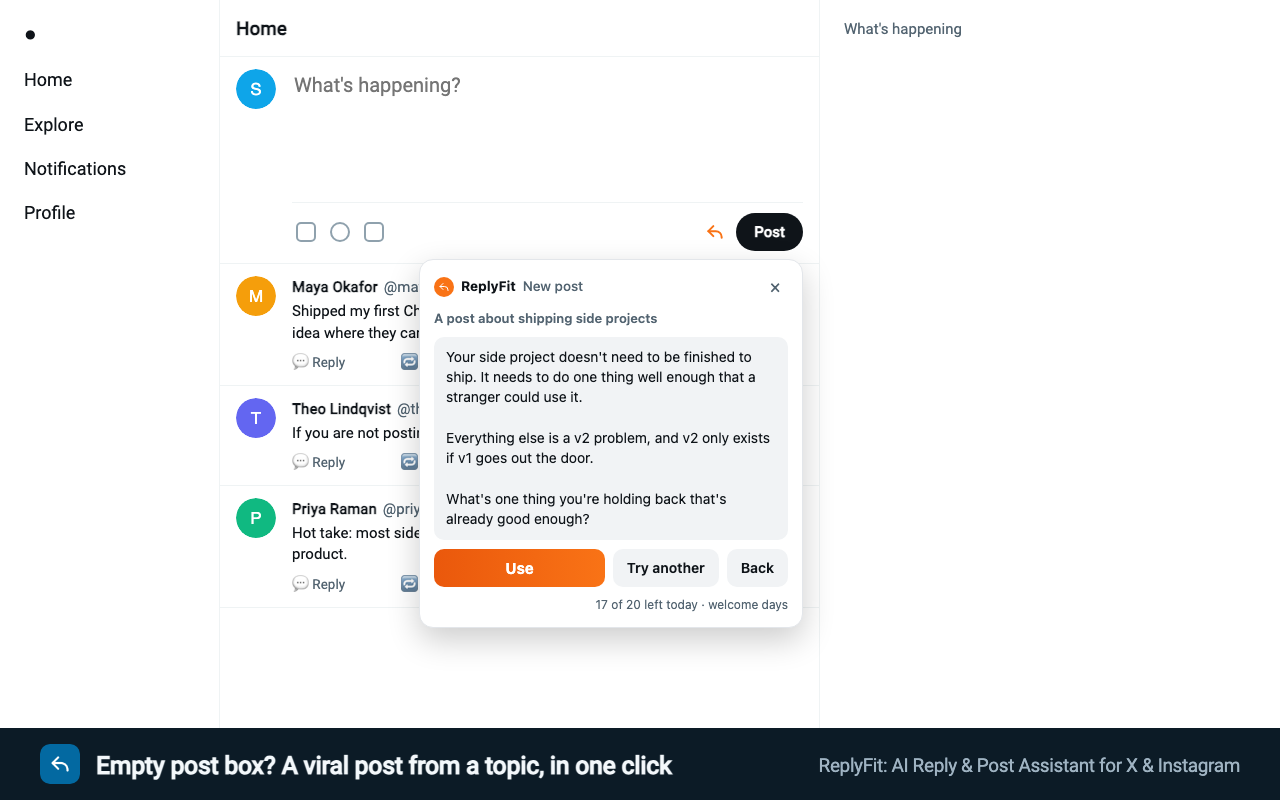
Wrote a post? Make it viral
Make it viral opens with your boldest line and cuts the rest down. Rewrite & format tidies a rough draft, and a long one becomes a thread with a Copy button on every post. Your facts stay yours.
- Make it viral
- Rewrite & format
- Threads, ready to copy
ReplyFit
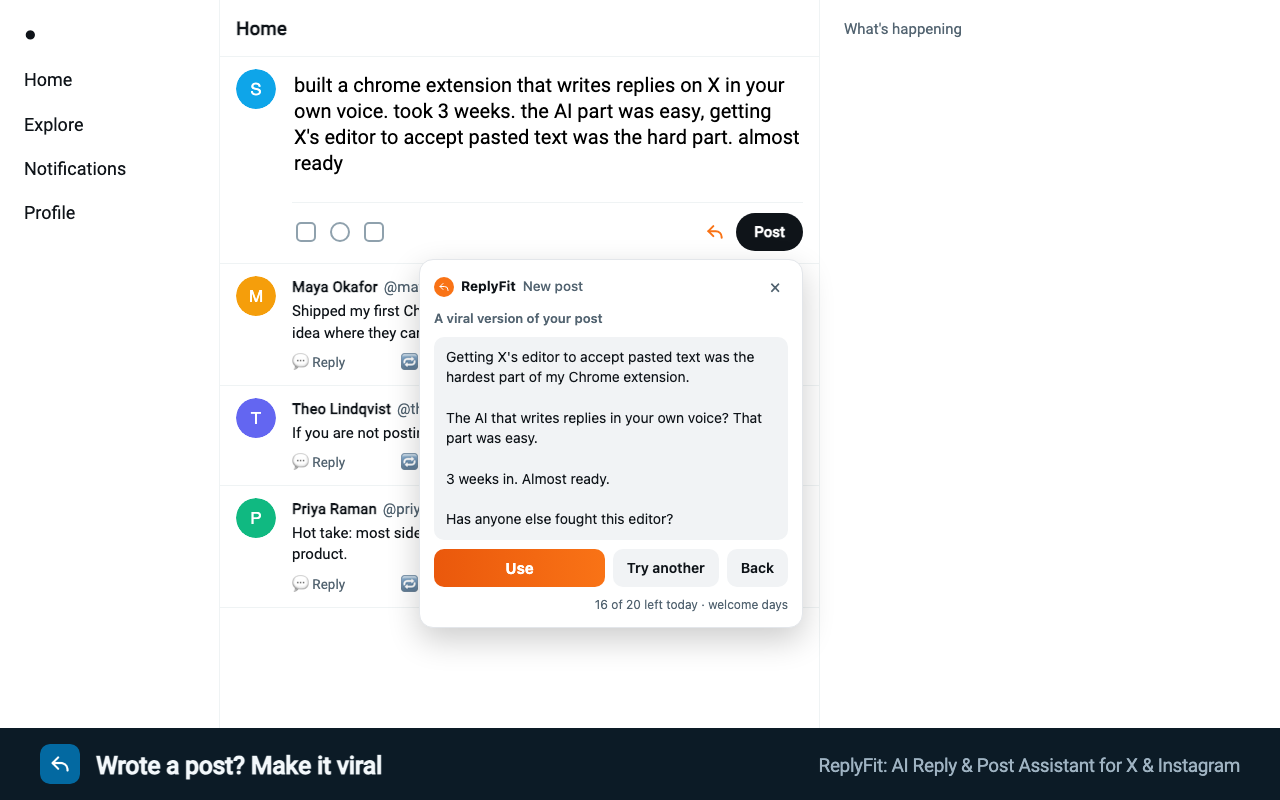
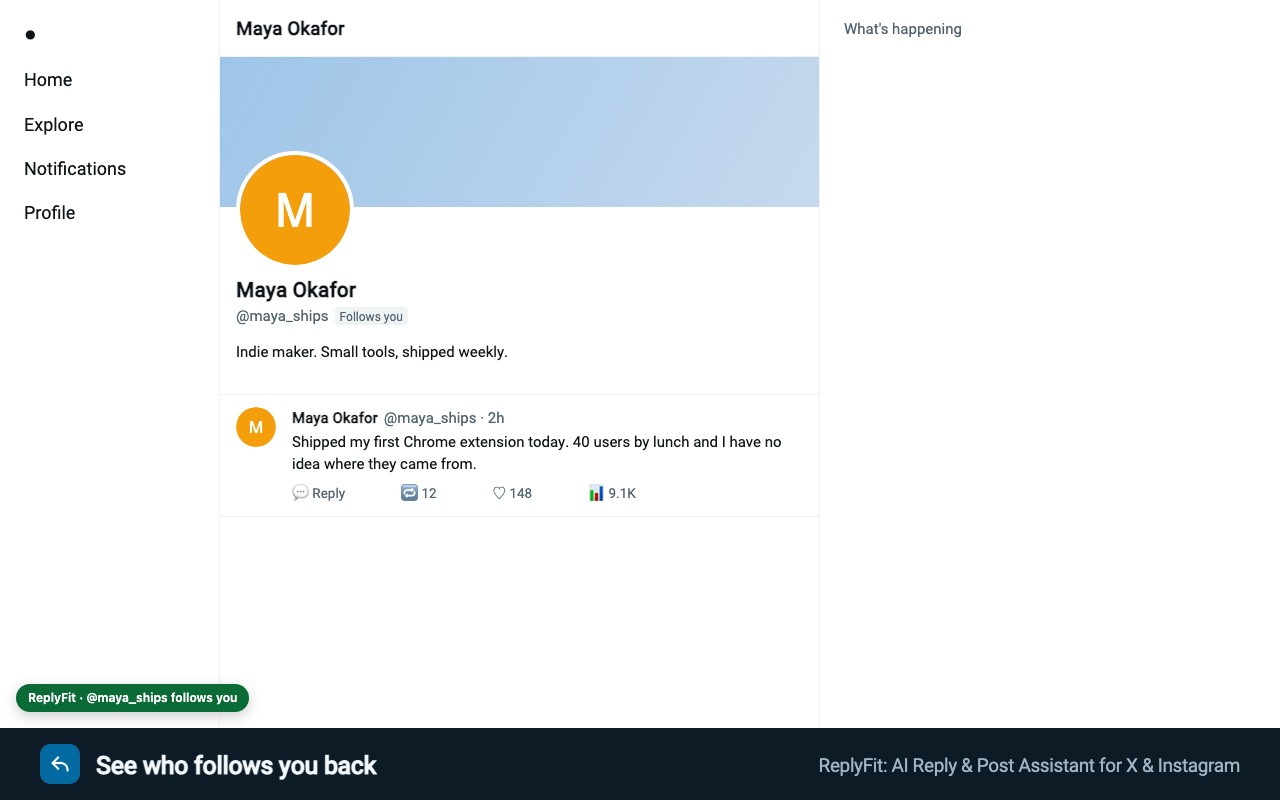
See who follows you back
ReplyFit remembers what a profile showed you, so the answer is there next time you reply to that person from your feed.
- Remembered for 30 days
- Stays in your browser
ReplyFit
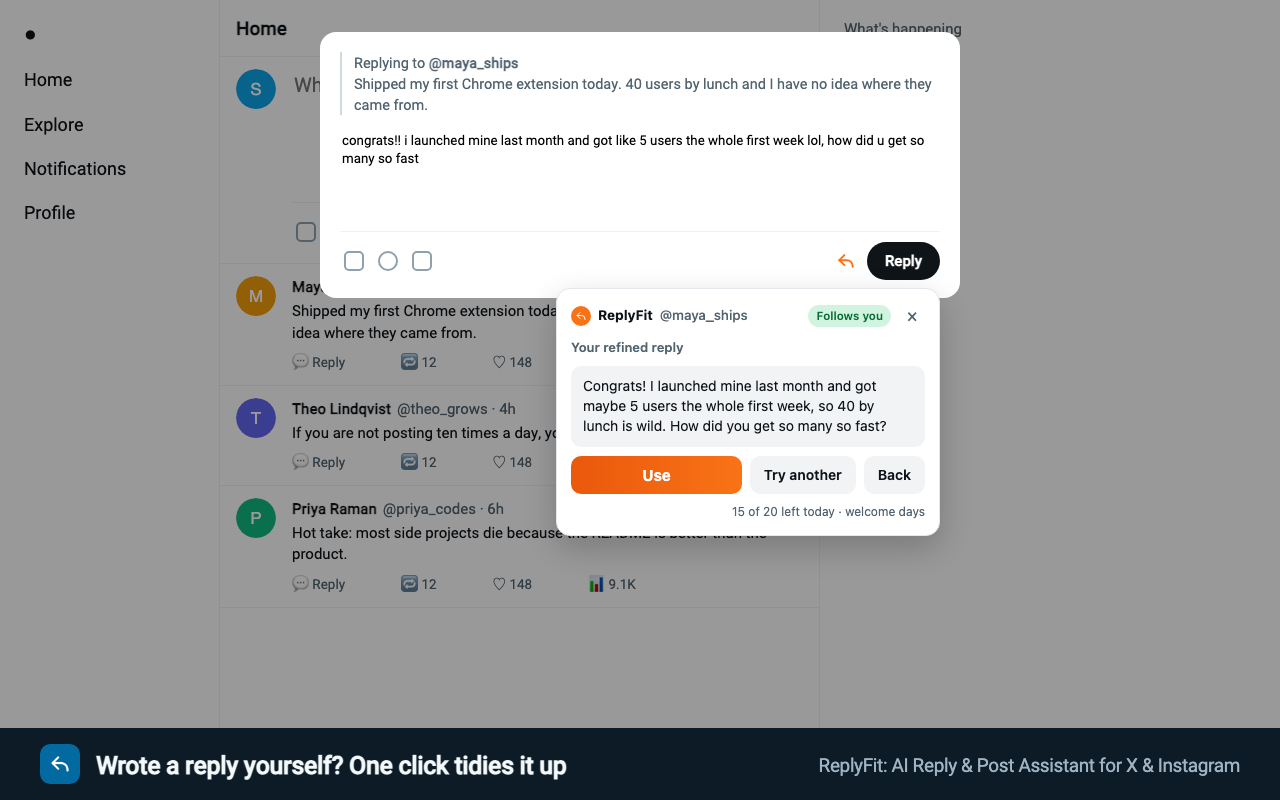
Wrote a reply yourself? One click tidies it up
Refine what I wrote gives a cleaner version of your own reply that keeps your meaning and never adds points you did not make.
- Keeps your meaning
- Adds nothing you did not say
The problem
Replies are how small accounts grow, and they take the longest to write
A good reply is specific, short and sounds like you. Writing twenty of them a day is slow, and the AI tools that do it for you write the same “Great insight! 🚀” everyone has learned to scroll past.
Who follows you back
X shows it on the profile; Instagram only hints at it. ReplyFit remembers what each profile showed, so the answer is there when you reply from your feed.
A reply in your voice
You set the length and what it must never say once. For each reply you pick a tone and what it should do, and can add your own words; ReplyFit writes one, and quietly writes it again if it misses a check.
Your own words, tidied up
Typed a reply yourself? Refine what I wrote gives a cleaner version that keeps your meaning and your points, and never adds things you did not say.
Checked before you see it
Every reply is checked for sounding human, being about the post, and matching what you asked for. Anything a reply missed is named under it, so you know what to edit.
Viral posts on X in one click
Empty post box? Give it a topic, or leave it to the line about you, and press Write a viral post. Already wrote one? Make it viral, Rewrite & format, or split a long one into a thread. Every post is checked for a first line that makes people stop scrolling, and never makes up stories or numbers about you.
How it will work
Three steps, and you stay in charge.
- 1
Open a reply box
A small orange ReplyFit button appears next to Reply. Nothing pops up, it never takes your cursor, and nothing is read or sent until you press it.
- 2
Write, or refine yours
Press the button, pick a tone and what the reply should do (up to two), add your own words if you like, and press Write reply. Typed your own already? Press Refine what I wrote instead.
- 3
Use, edit, post
Use puts the reply in the reply box. You change what you like and press Post. Nothing is ever posted for you.
Where it will run
Where it will run
Only on the two sites, and only on what is already on your screen.
X
Reply on any post, and help with new posts and threads. Follow status from profiles you have opened.
Reply to a post or comment on the web. Follow status when a profile shows Follow Back.
Nowhere else
The extension has no access to any other site.
Privacy, plainly
What it reads, and what it never does.
It reads the post you reply to and your style settings. No logins, no API connection to your accounts.
What it will read
- The text and author handle of the post, when you press Write reply or Refine
- What you typed in the reply box, only when you press Refine
- What you typed in the post box on X, only when you press Polish, Turn into a post or Make it a thread
- Whether that person follows you, as shown on their profile
- Your style settings and the words you add
What it never touches
- Your password, messages, followers list or anyone else’s profile in the background
- Posts, likes, follows or replies on your behalf
- The X or Instagram API: it never asks you to connect an account
When you press Write reply or Refine, the post text, handle, follow status, your style settings, any words you added and, for Refine, the reply you typed go to our server, then to Anthropic (which writes the replies) and TypeSafe (which checks them). For a new post, only what you typed in the post box and your style settings go, the same way. Our server does not keep them. Follow statuses stay in your browser. Read the full privacy policy
Planned pricing
Free starts with 20 drafts a day for your first 3 days, then 5 a day.
If you reply or post more, pick a monthly allowance. On every plan the daily limit starts low and grows as you use it, up to twice what you used the day before, the way a real account’s activity grows.
Free
$0
- 20 drafts a day for your first 3 days, then 5 a day
- Each gives one reply or post, checked before you see it
- Follow status, unlimited
- No account, no card
Starter
$5 a month
- 600 drafts a month, about 20 a day
- Starts at 50 a day, grows to 100
- Up to 3 browsers
Pro
$15 a month
- 2,000 drafts a month, about 65 a day
- Starts at 100 a day, grows to 300
- Launch offer on the first month: see plans
Growth
$29 a month
- 6,000 drafts a month, about 200 a day
- Starts at 150 a day, grows to 300
- For people who reply all day
Nothing is charged for joining the waitlist.
Will it post for me?
No, never. It fills the reply box when you press Use. Posting is always your click.
Can my X or Instagram account get in trouble for using it?
ReplyFit is built to stay inside both sites’ rules: it writes replies only when you ask for them, never posts, likes or follows, and makes no requests to X or Instagram of its own. X allows AI help with writing that you then post yourself. What both sites penalise is spam: lots of near-identical replies, fast. That is up to how you use it, and it is why you choose every reply yourself and why the daily limit starts low and grows only as you use it, the way a real account’s activity grows.
Is ReplyFit made by X or Meta?
No. ReplyFit is an independent extension, not affiliated with or endorsed by X Corp. or Meta. X and Instagram are their trademarks.
How does it know if someone follows me?
It reads the “Follows you” label on their profile on X, or the “Follow Back” button on Instagram, when you open it. It never walks follower lists.
Why does Instagram sometimes say unknown?
Instagram only shows Follow Back when they follow you and you do not follow them. If you follow each other, the page looks the same as if they did not, so ReplyFit says it cannot tell rather than guess.
Will the replies sound like AI?
Each draft is checked for that before you see it, and written again once if it fails. You set a “never use” list for the phrases you hate.
Will it make my post go viral?
Nobody can promise that, and ReplyFit does not. What it does is give each post its best shot: the strongest line first, one clear point, short lines, and no hashtag stuffing or bait that X pushes down. Each version is checked for a strong opening and for keeping what you meant.
Can it write threads?
Yes, on X. Type something longer than one post and press Make it a thread: ReplyFit splits it into 2 to 8 posts of up to 280 characters each, with a Copy button on every post (and Copy all), so you paste them into X’s thread one by one. A thread counts as two drafts.
Why does my daily limit change?
On paid plans it grows with use: tomorrow you can do up to twice what you did today, up to your plan’s ceiling (100 on Starter, 300 on Pro and Growth). A day off starts again from the plan’s starting limit. It keeps your account’s activity growing the way X expects from a real person.
How do I turn on a plan?
After checkout you get a licence key by email. Click the ReplyFit icon, paste the key and press Activate; the popup shows your plan. One key works on up to 3 browsers, and they share one allowance.
What counts as a draft?
Each press of Write reply, Refine, Write a viral post, Make it viral or Rewrite & format counts as one draft and gives you one reply or post; if it is written again because it missed a check, that is free. A thread counts as two. Pressing the orange button costs nothing. You can make up to 10 drafts a minute, a pace no person replying by hand needs to go past.
What is the launch offer?
The first 10 people to subscribe to Pro pay $5 for their first month, and the next 20 pay $7, with the code shown on the plans page. It covers the first month only; after that Pro is $15 a month. One per customer. The plans page shows how many are left, counted from real sign-ups.
Can it polish what I wrote?
Yes. Type your reply, press the orange ReplyFit button in the reply box, then Refine what I wrote. You get a cleaner version that is checked to keep your meaning, and Use replaces your text.
How do I change my plan?
Open your billing portal from the link in your receipt email and switch plans there; you pay only the difference for the rest of the month. A new key for the new plan arrives by email: paste it into the ReplyFit popup and press Activate. The old key stops working.
Which AI writes the drafts?
Claude Sonnet 5.5, made by Anthropic, on every plan, free included. Only if it is ever down or too slow does Claude Haiku 4.5 step in, so you are not left waiting. Plans differ only in how many drafts you get.
Can I get a refund?
Yes. Email us within 14 days of the charge and we refund it in full, no reason needed. If most of the plan was already used, we may refund the unused share instead.
When will it be ready?
It is in review for the Chrome Web Store. Join the waitlist and you get one email on launch day.
Reply more, post better, sound like yourself.
Leave your email and you will hear once, when it is ready.