Small tools that make the call for you.
Is this review fake? Is this headline bait? Which of these twelve tabs can go? Each extension answers one question, inside the pages you already use, in about a second.
Free to install · No account · No ads or trackers
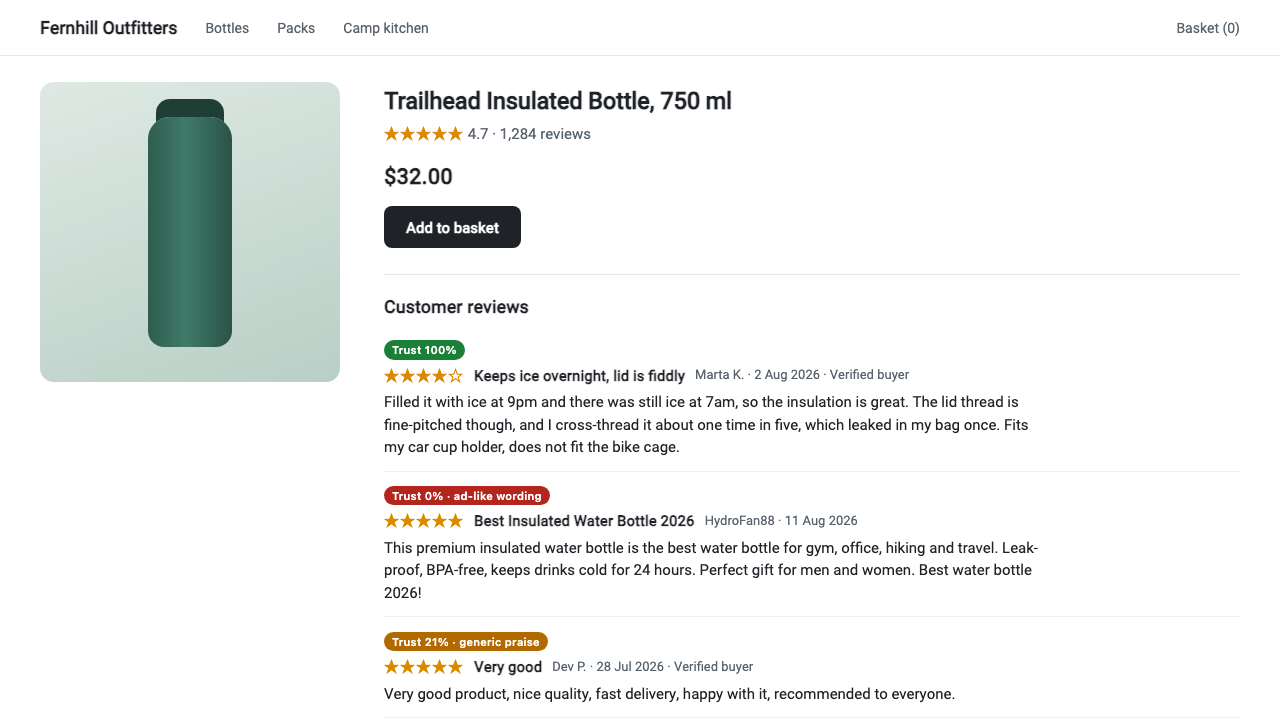
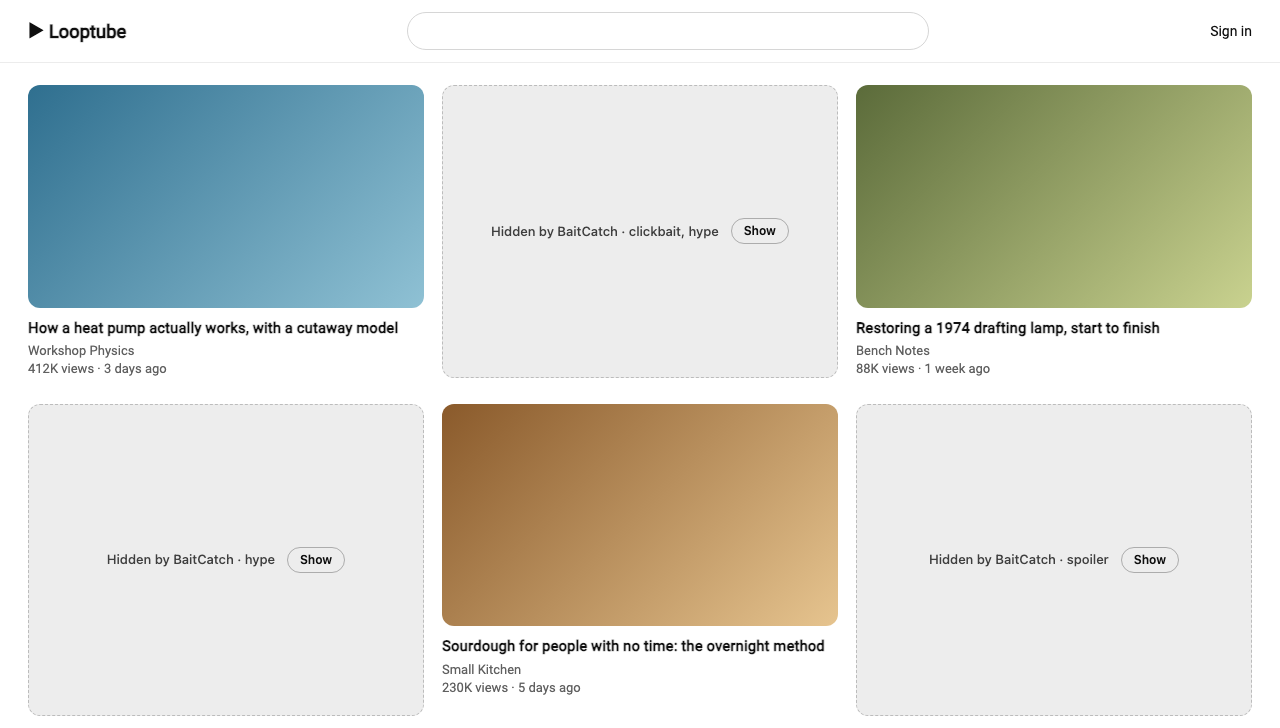
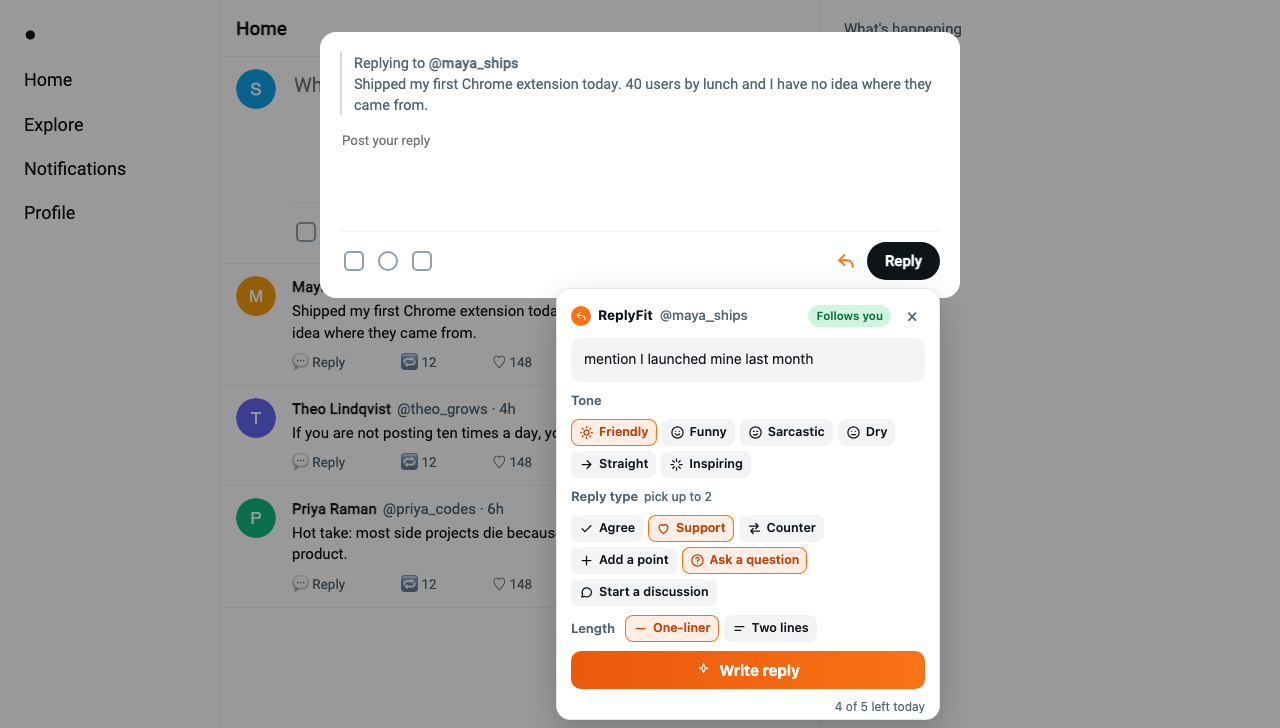
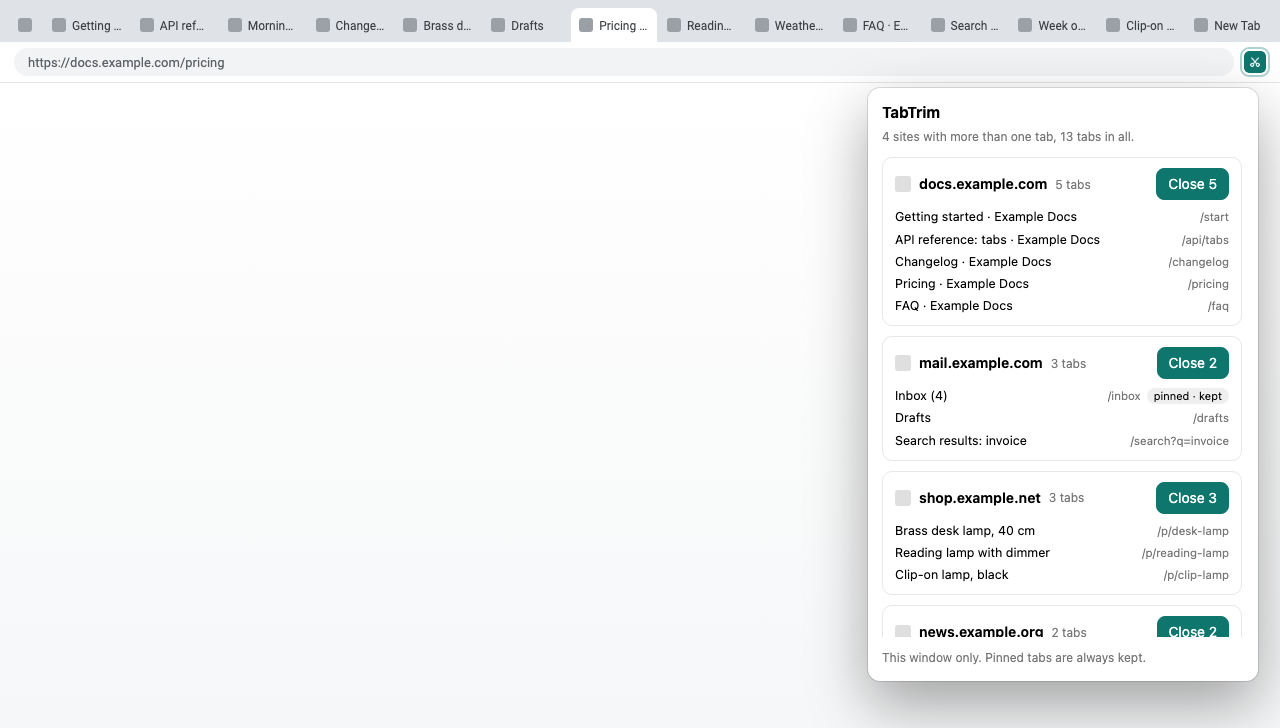
FakeCatch · Catch fake reviews before you buy. See how it worksBaitCatch · A calmer feed: clickbait, outrage bait and spoilers hidden before you read them. See how it worksReplyFit · Replies in the tone you pick, viral posts in one click, and whether the author follows you back. See how it worksTabTrim · Every site you have piled up tabs for, and one click to close them. See how it works
The tools
One job each, done inside the page.
No new app to open and no dashboard to check. Each one works on the sites it is for, and shows its answer where you are already looking.
 FakeCatch: Fake Review Detector
Catch fake reviews before you buy.
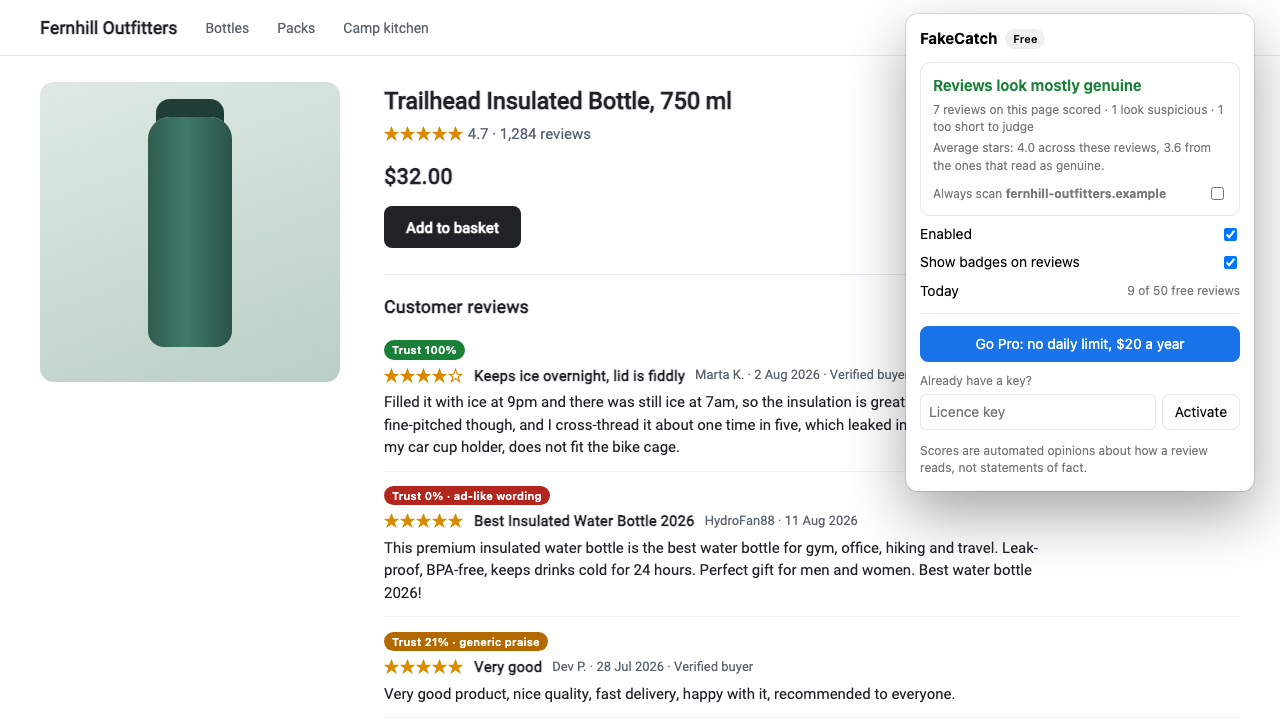
FakeCatch puts a trust score on every review while you shop. It runs by itself on Amazon, Flipkart and Trustpilot, and one click scans the reviews on any other store.
- Amazon, Flipkart, Trustpilot
- Any other store in one click
- Free: 50 reviews a day
 BaitCatch: Clickbait & Spoiler Blocker
A calmer feed, without the bait.
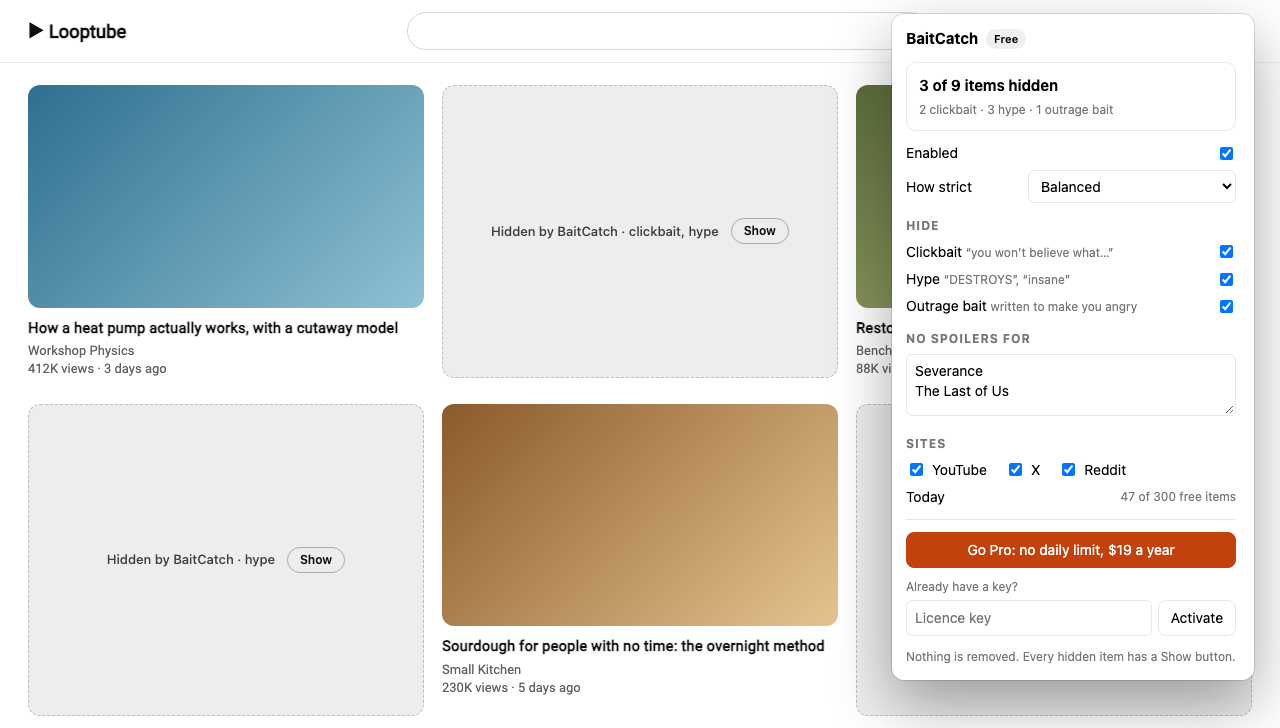
BaitCatch reads the headlines in your YouTube, X and Reddit feeds and folds away clickbait, hype and outrage bait, plus spoilers for the shows you name.
- YouTube, X and Reddit
- Nothing is deleted
- Free: 100 items a day
 ReplyFit: AI Reply & Post Assistant for X & Instagram
Reply in your own voice, post stronger, and know who follows you back.
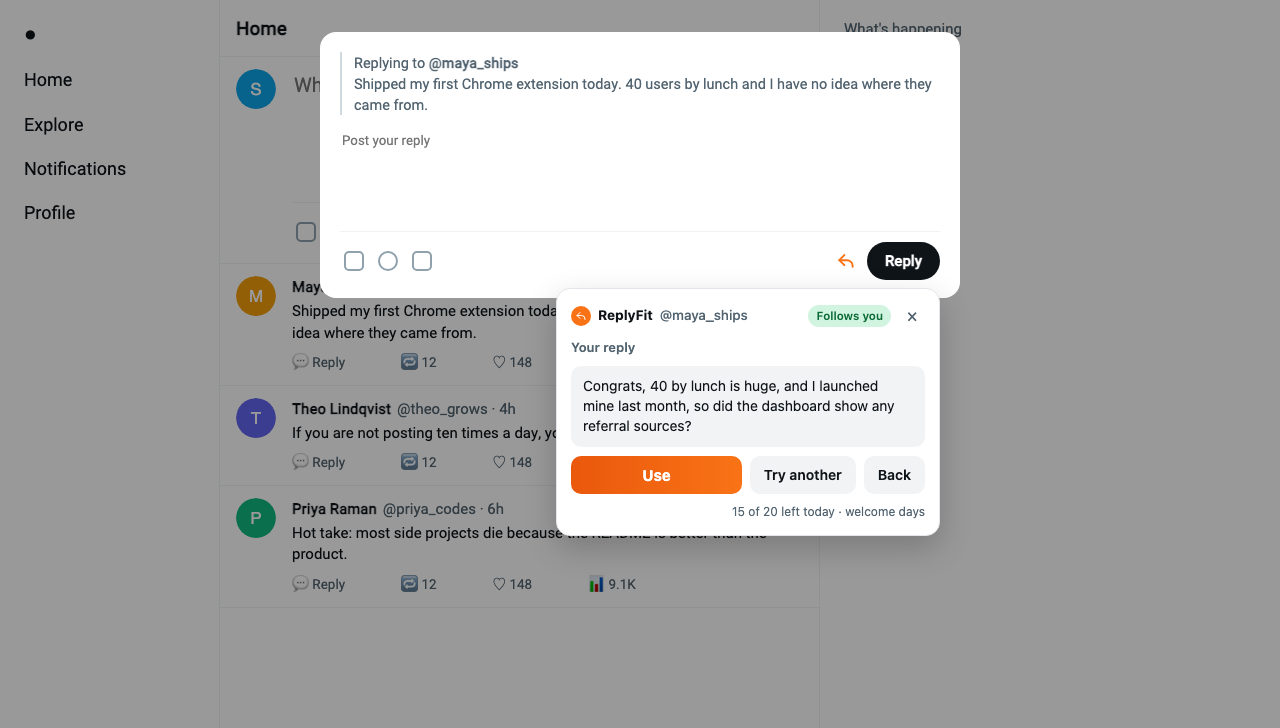
Open a reply box on X or Instagram and a small orange ReplyFit button waits next to Reply. Press it for a reply in the tone you pick, from funny to sarcastic, or to tidy the one you wrote. Writing a post on X? The same button writes a viral post from a topic in one click, or makes your own draft go viral. You edit and press Post yourself.
- Replies on X and Instagram, posts on X
- You always press Post
- Free: 20 a day for your first 3 days
 TabTrim: Close Tabs by Site
Twelve tabs of the same site? Close them in one click.
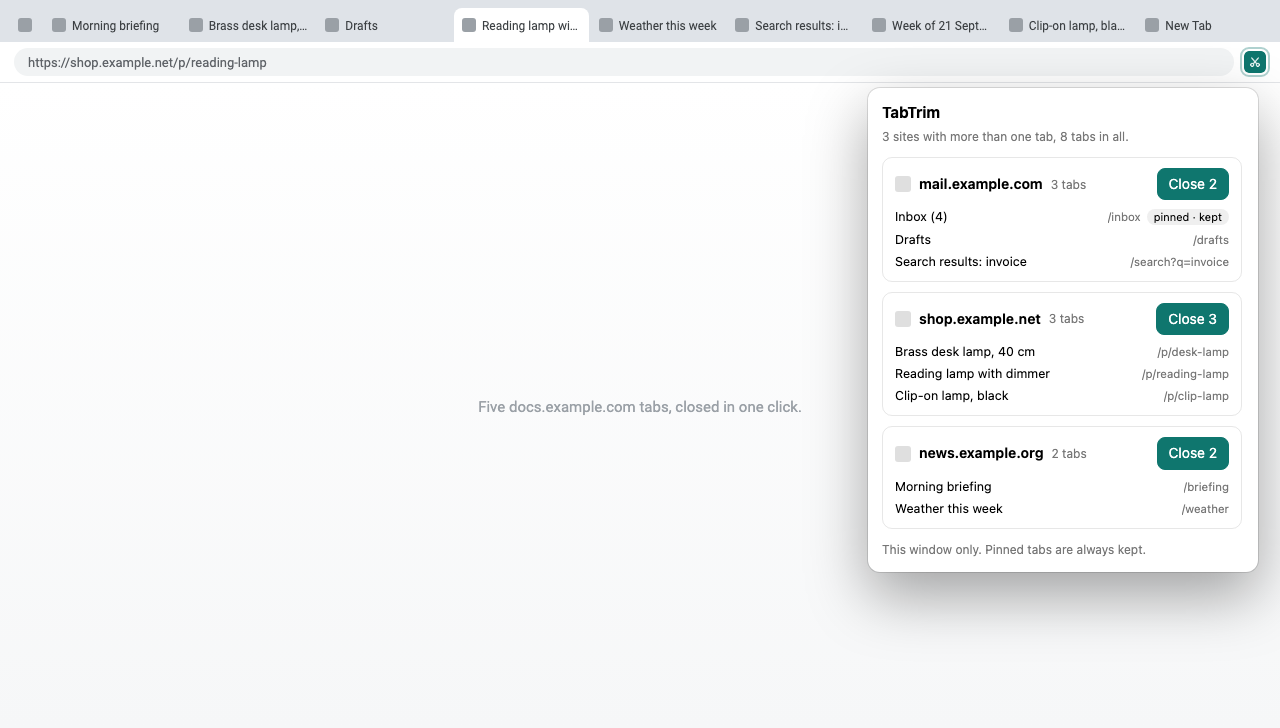
TabTrim lists the sites you have more than one tab open for, shows you each tab, and closes all of one site’s tabs at once. Pinned tabs are always kept.
- One click per site
- Pinned tabs always kept
- Free, no server
Try it now
Paste a review. See what FakeCatch makes of it.
This is the real check the extension runs, not a recording. It answers in about a second.
Runs the same check as the extension. Your text is scored and the score is shown to you; see what happens to it. 10 tries a day.
What’s inside
10 tools. Install only the ones you need.
Each is its own extension, with its own page that says exactly what it reads and what it costs. The ones still in development get built in the order people ask for them.
- FakeCatch Fake Review Detector Catch fake reviews before you buy. Live · free to start
- BaitCatch Clickbait & Spoiler Blocker A calmer feed: clickbait, outrage bait and spoilers hidden before you read them. Live · free to start
- ReplyFit AI Reply & Post Assistant for X & Instagram Replies in the tone you pick, viral posts in one click, and whether the author follows you back. Live · free to start
- TabTrim Close Tabs by Site Every site you have piled up tabs for, and one click to close them. Coming soon
- PhishSweep Phishing Email Detector for Gmail A plain warning on the emails that are trying to trick you. In development
- ScamSweep Scam Message Detector for WhatsApp Web A quiet warning under WhatsApp messages that look like a scam. In development
- CommentCatch YouTube Comment Manager Find the comments that deserve a reply, without reading all of them. In development
- ClutterCatch Gmail Inbox Cleaner Sort the inbox into what needs you and what can go, without handing anyone your Gmail. In development
- ClaimCatch Ad Copy Compliance Checker Catch the claim that gets your ad rejected, while you are still typing it. In development
- AccessCatch Accessibility Checker for WCAG & EAA The accessibility problems a rule checker cannot see. In development
Pricing
Free first. Fair after.
Every tool is free to install and free for everyday use. If you use one a lot, its paid plan lifts the limit. No account, and a 14-day refund on every plan.
| Tool | Free | Paid |
|---|---|---|
| FakeCatch | 50 reviews scored a day | $10 a year |
| BaitCatch | 100 feed items a day | $10 a year |
| ReplyFit | 20 drafts a day for your first 3 days, then 5 a day | From $5 a month |
Prices in US dollars; tax is added at checkout where it applies. Payment by Dodo Payments. Refund policy
Principles
Stays out of your way.
Four rules every tool here follows, written down before any of the code.
It reads only what it needs
Each extension runs on a short list of sites, or only when you click it. None asks for “all your data on all websites” at install.
It tells you what happens to it
Every tool page has a “what it reads, what it never touches” section, written before the code, and a full policy with no vague promises.
It looks, and never acts for you
No tool here posts, replies, deletes, buys or clicks on your behalf. The one that closes tabs does it only when you press Close.
No ads, no trackers, no account
Nothing to sign up for and nothing sold. Paid plans are a licence key you paste in, and every one has a 14-day refund.
Who makes these?
Suman Kumar, a solo developer. Each tool is small on purpose: it does one job and says exactly what it reads, and a real person answers every email to support@codewithkolin.com.
Why do some of them need a server?
The ones that judge text (is this review fake, is this headline bait, is this reply any good) use an AI model far too large to run inside a browser. The text they need goes to our server and on to the model, and the answer comes back in about a second. Each tool’s page lists exactly what is sent and what is kept. TabTrim needs no server at all and makes no network requests.
What happens when I reach the free limit?
That tool stops checking until midnight UTC, when the count resets. Nothing breaks and nothing is locked away. If you use one a lot, its paid plan lifts the limit, and you never need an account.
Which browsers do they work in?
Chrome on a computer. Other browsers built on Chrome that install from the Chrome Web Store, such as Microsoft Edge and Brave, can run them too, though they are tested less. Phone browsers do not run extensions.
Can I get a refund?
Yes. Every paid plan has a 14-day refund, no reason needed. Email us and it is done. Refund policy
Can I ask for a tool?
Yes. Join the waitlist on any tool marked In development: the ones with the most sign-ups get built first. Or email an idea to support@codewithkolin.com.
Give your browser a second opinion.
Start with the one you need. Each is free to install, and none needs an account.